Print your guarantee label: the GARAN-Label as EPS or PDF
For manufacturers and retailers who show their guarantee not only on the product page but also on the packaging, in an insert or right there in the shop. GARAN-Label generates every label either as a vector file for your print shop or as a print-ready A4 page for your office printer.
Short version: a GARAN-Label is not a ready-made template to download. It is generated individually for each product with your brand, your model identifier and your guarantee duration. You choose the file format: PNG for product pages and emails, EPS as a vector file for your print shop, or PDF as an A4 page for your own printer. EPS and PDF print at any size without loss of quality. Every generated file costs one credit. The free sandbox mode delivers a PNG preview with a watermark; the sample files further down show what EPS and PDF look like.
When a guarantee label has to be printed
The labelling requirement for manufacturer guarantees of more than two years is tied to the offer, not to the sales channel. An online shop shows the GARAN-Label on the product detail page. If you sell the same goods in a physical shop, the label has to be available there too. In practice that means on the packaging, in an insert or the manual, or as a sign right next to the product.
That calls for a print file that meets the formal requirements of Implementing Regulation (EU) 2025/1960: a minimum size of 95 × 100 mm, the fixed design elements (tick, calendar icon, QR code) and the prescribed colours. A screenshot from your shop does not meet them. The background to the requirement is on our EU Requirement 2026 page.
Packaging
Manufacturers print the label directly on the folding box, a sticker or a sleeve. The EPS is placed in the packaging artwork and printed together with the rest of the design.
Inserts and manuals
Guarantee card, leaflet or the first page of the manual: the label ships with the goods and reaches the customer regardless of the sales channel.
In-store
Retailers with no say over the packaging print the A4 PDF and put it up on the shelf or product display, visible before the purchase.
Three file formats, one label
All three formats contain the same GARAN-Label with brand, model identifier, guarantee duration and QR code. They only differ in what the file is meant for.
| Format | Use | Technical | Opens in |
|---|---|---|---|
| PNG | Product pages, marketplaces, order confirmations, PDF invoices | Pixel image, 500 × 526 px | Every browser, every email client |
| EPS Sample file | Print shop: packaging, inserts, manuals | Vector file, set up at 95 × 100 mm, scalable to any size without loss of quality, CMYK, text as outlines | Layout software such as InDesign, Illustrator, Affinity, CorelDRAW |
| PDF Sample file | Your own printer: in-store sign, short-run guarantee card, proof print | A4 page with the label at 190 × 200 mm, also vector and therefore printable at any size, CMYK | Every PDF reader, every office printer |
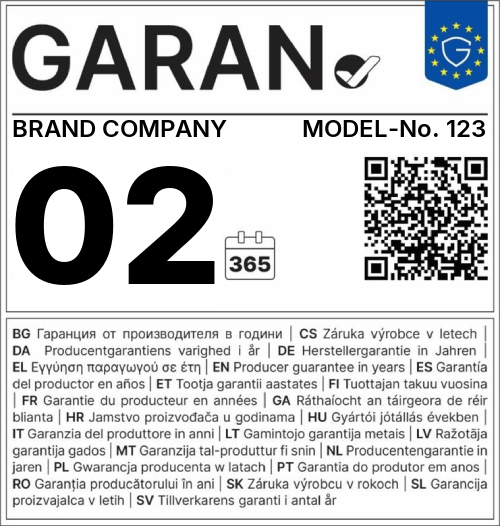
What size can the GARAN-Label be printed at?
The EU template prescribes a minimum size of 95 × 100 mm; there is no upper limit. This is exactly where EPS and PDF pay off: both are vector files. Unlike a pixel image, they are not made of individual dots but of mathematically described lines and shapes. Whether you print the label at 95 × 100 mm on a folding box or enlarge it to 50 × 53 cm for a poster makes no difference: edges, text and QR code stay razor-sharp at every size.
That applies to the EPS as much as to the A4 PDF. The PDF is laid out as an A4 page with the label at 190 × 200 mm, but it contains the same vector data. Scale it up to A3 when printing or place it scaled down in a document, without any loss of quality.
Try it yourself. Both files come from our generator, produced with sample data in place of your brand, your model identifier and your guarantee duration. Technically they are identical to what you get for your own product: the same layout, the same vector data, the same CMYK. If you are unsure whether the format fits your print workflow, experiment with these before spending a credit. Open either file, zoom in as far as you like or print it at different sizes:
The only things that will differ in your own file are the brand, the model identifier and the guarantee duration. Everything else stays exactly the same.
EPS: the vector file for your print shop
The EPS is the format you hand to your print shop or packaging agency. It is set up so that it can be placed in the artwork without any rework.
Set up at 95 × 100 mm, printable at any size
The file is set up at the minimum size of the EU template. Because it consists of vectors, your print shop can enlarge it in the artwork to any size you need without edges, text or QR code losing sharpness. The proportions stay fixed; only the size changes.
CMYK with K-only black
The colour space is CMYK. Black is set as pure K, so it sits on a single printing plate. That matters for the small 9 pt legend and the QR code: a black built from four colours would blur at the slightest misregistration, and a blurred QR code no longer scans. The template blue is set as Pantone Reflex Blue (C 100, M 80), the yellow as Pantone Yellow (Y 100), both without any black component.
Text as outlines
Brand, model identifier, guarantee duration and all fixed text are converted to paths. Your print shop does not need to install any font, and no font can go missing or be substituted. The flip side is intentional: the text cannot be edited in the file. Changes to brand, model or duration go through a new generation, so the label always matches the template.
No preview in the browser
Browsers and email clients cannot display EPS, so the portal offers the print formats as a download only. Open the file in your layout software to check it. For your online shop the PNG remains the right choice.
PDF: the A4 page for your own printer
Not everyone has layout software or a print shop at hand. The PDF is made for exactly that case: one A4 page with the label enlarged to 190 × 200 mm, twice the minimum size, centred with a 10 mm margin. It contains the same vector data and the same CMYK as the EPS, opens on any computer and prints on any office printer.
- In-store sign: print it, put it up on the shelf or product display, done.
- Short-run guarantee card: for custom builds or small batches where a print-shop order is not worth it.
- Proof print: to check the content and look of the label before the packaging goes into production.
The PDF is deliberately a plain print PDF without a PDF/X identifier and without an embedded ICC profile. For an office printer that makes no difference. For a print-shop order, place the EPS in your packaging or insert artwork instead.
How to generate a GARAN-Label for print
Register for free and check the sample files
Sign up with your name and email address, no password needed. The free sandbox mode delivers the label as a PNG with a "SAMPLE" watermark. EPS and PDF are generated live straight away, so use our sample files first to check that the format works with your layout software or printer.
Enter brand, model identifier and guarantee duration, then pick a file format
Fill in the three variable fields of the label and choose EPS for your print shop or PDF for your own printer. For many products at once, upload a CSV file or call the API with the format parameter.
Download the file and print it
Download the finished file. Hand the EPS to your print shop or place it in your packaging artwork yourself. Open the A4 PDF in any PDF reader and print it straight away.
Already have an account? Log in and generate your print file straight away in the portal.
For large catalogues, generate print files in bulk: with the CSV
upload you pick one format per file, which applies to every row.
Via the API you set the format per call with the
format parameter (png, eps
or pdf). Details on the
API & CSV page.
What does a GARAN-Label for print cost?
The same as any other label: one credit per generated file, regardless of format.
Each format is a separate file. If you need the same label as a PNG for your shop and as an EPS for your packaging, that uses two credits. An identical repeat with the same brand, model, guarantee duration and format costs nothing extra. The free sandbox mode delivers the label as a PNG with a "SAMPLE" watermark. EPS and PDF are generated live only; to check the file and your workflow first, use the sample files above.
| Credits | Price | Price per label |
|---|---|---|
| 100 | €19.00 | €0.19 |
| 500 | €49.00 | €0.10 |
| 2,000 | €144.00 | €0.07 |
| 10,000 | €569.00 | €0.06 |
All prices exclude statutory VAT. 1 credit equals 1 newly generated label. Identical repeats (same brand, model, warranty duration) do not cost an additional credit. No subscription, no minimum purchase.
Generate a GARAN-Label for packaging or in-store
Register for free, check the sample files with your print shop or on your own printer, then generate your first EPS or PDF.
Frequently asked questions about printing the guarantee label
Can my print shop work with the EPS file directly?
Yes. EPS is a standard format that can be placed in any layout application, such as Adobe InDesign, Illustrator, Affinity Publisher or CorelDRAW. The file is set up in CMYK, black is K-only and all text is converted to outlines, so your print shop does not need to install fonts or convert colours. If they require a PDF/X, they export it as usual from the layout application the EPS was placed in.
May I print the GARAN-Label larger than 95 × 100 mm?
Yes. 95 × 100 mm is the formal minimum size in print. Because EPS and PDF are vector files, they can be enlarged without any loss of quality, for example for the back of a box or an in-store sign. Keep the aspect ratio and never go below the minimum size.
Why is there no preview of the EPS file in the portal?
Browsers and email clients cannot display EPS, so the print formats are offered as a download only. Open the file in your layout application to check it. If you just want to see what the label looks like, generate the PDF or the PNG as well: all three formats show the same content.
Can I generate print files via CSV upload or the API as well?
Yes. With the CSV upload you choose one file format per upload, which then applies to every row. Via the API you pass the format parameter with the value png, eps or pdf. Without it, a PNG is generated.
Does an EPS or PDF cost more than a PNG?
No. Every generated file costs one credit, regardless of format. Because each format is a separate file, the same label as PNG and as EPS uses two credits. An identical repeat with the same brand, model, guarantee duration and format does not cost another credit.