Generating GARAN-Labels for a large catalogue: CSV vs API
You want to bulk generate GARAN-Labels for a few hundred or a few thousand products and need three answers first: can the tool handle my catalogue, what will it cost, and how long will it take. This page answers all three with concrete numbers.
Which method fits your catalogue?
The right method depends on two things: how many products need a label, and how often that data changes.
| Method | Catalogue size | Change frequency | Best for |
|---|---|---|---|
| Manual entry | Fewer than 10 labels | Rarely | Small shops, a handful of guaranteed products, one-off additions. |
| CSV upload | 10 to 10,000 labels | Mostly static, a refresh every few months | Retailers and brands with a large but stable catalogue. No programming needed. |
| API | Any size | Frequent changes, new products every week | Shops driven by a PIM or ERP, agencies, anyone who wants labels created automatically when a product is created. |
You can mix them: most large catalogues start with one CSV run for the existing range and switch to the API for new products. Technical details for both live on the API & CSV reference page.
Filter first, generate second: which SKUs even need a label
The most effective way to cut the cost of a bulk run happens before the upload. The GARAN-Label is only required for products where a producer offers a free commercial guarantee of durability covering the whole product for more than two years. Every other product needs the free legal guarantee notice, but no GARAN-Label.
Run your product export through three questions:
- Is it a physical good? Digital content and services are out of scope.
- Does a producer guarantee of more than two years exist? A guarantee of exactly two years or less does not trigger the label.
- Is it free and does it cover the whole product? Paid extended warranties and guarantees on single components do not count.
In practice a 5,000-SKU catalogue often shrinks to a few hundred products that actually qualify. Everything else you can drop from the CSV before you upload it. Details on who the requirement applies to →
What you need per SKU: brand, model, duration
The label itself is simple. It carries three values, and the CSV needs exactly these three columns:
brand
The brand or trade mark as it appears on the product.
model
The model identifier. Variants that share it share the label.
duration
The guarantee duration in years, whole or half years, for example 3 or 2.5.
The honest hard part: the guarantee duration
Brand and model exist in every shop system. The producer's guarantee duration usually does not. Most product databases have a "warranty" field at best, and that field often holds the retailer's own terms rather than the producer's guarantee. Where the data usually hides:
- Supplier price lists and product data sheets, often as a free-text remark.
- The guarantee terms on the producer's website or in the packaging insert.
- A PIM or ERP attribute that was filled once for a few brands and never maintained.
Practical shortcut: producers rarely set the duration per SKU. It is usually constant per brand or per product series. Collect the duration once per brand and series, then join it onto your SKU export. That turns a research task over thousands of rows into a list of a few dozen entries.
Worked example: a 1,000-SKU catalogue
The figures below are an illustration with round numbers, not a measurement from a specific customer. They show how the arithmetic works so you can plug in your own catalogue.
| SKUs in the shop | 1,000 | Full export, all categories. |
| SKUs with a producer guarantee over two years | 380 | After the three filter questions above. The other 620 only need the free notice. |
| Unique brand + model + duration combinations | 240 | Sizes and colours share a model identifier and therefore a label. |
| Credits used | 240 | One credit per rendered label. Rows with a duplicate combination reuse the existing label. |
| Credit package | 500 credits for €49 | Leaves 260 credits for new products. Alternatively, two 100-credit packages for €38 if you know the range will not grow. |
| Your time | Half a day | Almost all of it goes into collecting the guarantee durations. The upload takes minutes, the generation runs unattended. |
The result is a file with one line per input row and the URL of the matching label. You then download the images and place them in your shop, see below.
Preparing the CSV file
Any spreadsheet program can produce the file. What matters:
- Columns:
brand,model,duration, and optionallyforce_regeneration(1forces a fresh render, empty or0reuses an existing label). - Separator: comma or semicolon. The upload detects which one you used from the header line.
- Encoding: UTF-8, so umlauts, accents and special characters in brand and model names come through intact.
- Row and file size limit: none. The file is read line by line, however large it is.
- Format: before the upload you choose PNG, EPS or PDF for the whole file. PNG is what you need for the shop, EPS and PDF are for printing.
- Processing: runs in the background with a progress indicator. You can close the tab, log out and come back; the job continues.
brand;model;duration;force_regeneration
Bosch;GSR 18V-55;3;
Bosch;GSR 18V-55;3;
Makita;DHP486;3;
Miele;W1 WCD 120;5;
The two Bosch rows are intentional: they show what the deduplication does. Both rows get the same label URL, only one credit is used.
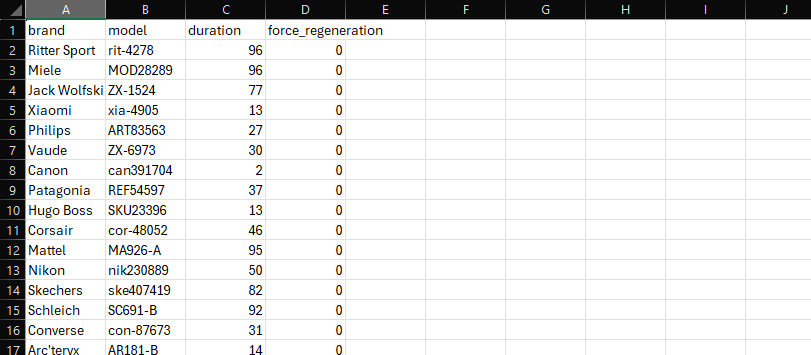
Input: one row per product or per model.
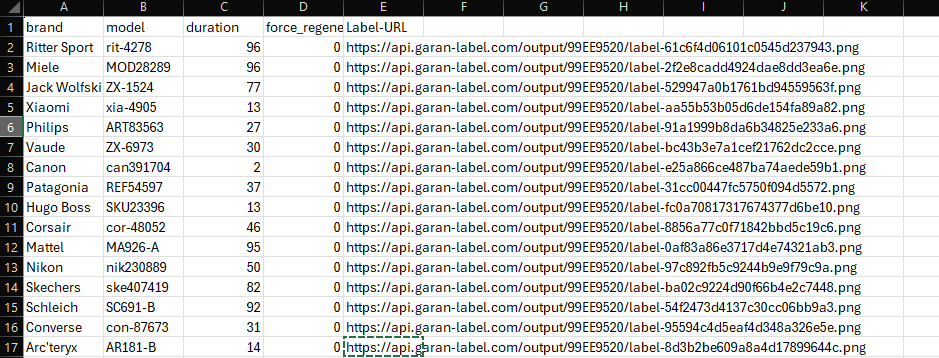
Output: the same rows plus the label URL for each.
Deduplication: the cost lever for bulk runs
A credit pays for a rendered label, not for a row in your file. The rule is simple: identical brand + model + duration means one label, no matter how many rows or how many product variants point to it. Three consequences for a large catalogue:
- Variants are free. Ten colour variants of one model use one credit.
- Re-running the same file costs nothing while the labels still exist on our server. You get the existing URLs back.
- Only real changes cost credits. A changed guarantee duration is a new combination and therefore a new label. Setting
force_regenerationto1also renders again and uses a credit, so leave it empty unless you need a fresh file.
The arithmetic from the example above: 1,000 rows, 240 unique combinations, 240 credits. Pricing is per label rendered, not per month and not per user seat, so a catalogue that does not change does not keep costing money.
Credit packages
| Credits | Price | Price per label |
|---|---|---|
| 100 | €19.00 | €0.19 |
| 500 | €49.00 | €0.10 |
| 2,000 | €144.00 | €0.07 |
| 10,000 | €569.00 | €0.06 |
All prices exclude statutory VAT. 1 credit equals 1 newly generated label. Identical repeats (same brand, model, warranty duration) do not cost an additional credit. No subscription, no minimum purchase.
Getting the files into your shop: hosted URLs vs self-hosting
Every generated label is reachable via the URL in your result file. For a large catalogue you have two ways to use it:
Hosted URL (short term)
Link the image directly. Fine for testing and for filling the shop quickly, but labels are archived 30 days after generation. After that the link breaks and a new request renders the label again, using a credit.
Self-hosting (recommended)
Download the images within the 30 days, upload them to your own media library or CDN, and map them to your products via SKU or model. That is a one-time job and the label stays online for as long as you need it.
How the mapping works depends on your platform: a metafield in Shopify, a product attribute in Magento 2, a custom field in WooCommerce. Each guide describes the bulk route. Guides by sales channel →
Errors and edge cases in large files
| Situation | What happens | What to do |
|---|---|---|
| A row has no model (or no brand or duration) | Only that row is marked as an error in the result file. All other rows are processed. | Fix the row and upload it again in a small follow-up file. |
| A required column is missing from the header | The whole job stops with the message "Missing required column". | Check the header names: exactly brand, model, duration. |
The header looks right but the job still reports a missing brand column | The file most likely starts with an invisible byte-order mark. Excel adds one when you save as "CSV UTF-8". | Save as plain CSV, or remove the mark with a text editor. The column names must start at the very first byte. |
| Rows with a duration of two years or less | They are generated like any other row and use a credit. The tool does not decide for you whether a label is required. | Filter them out before the upload; these products do not need a GARAN-Label. |
| Sizes and colours as separate rows | Rows with the same brand, model and duration share one label and one credit. | Nothing. Keep the rows if it makes the result easier to map back to your SKUs. |
| Commas or semicolons inside a model name | Standard CSV quoting applies. | Wrap the value in double quotes, as every spreadsheet program does automatically. |
| Umlauts and accents look wrong in the label | The file was saved in a legacy encoding. | Save it as UTF-8 and upload again with force_regeneration set to 1 for the affected rows. |
Test your file structure first: sandbox mode works for CSV uploads as well and renders watermarked PNG samples without using credits.
Ready to label your whole catalogue?
Register for free, upload a test file in sandbox mode and check the result before you buy a single credit.
Try for freeNeed the technical parameters and sample code? API & CSV reference →
Who needs the GARAN-Label at all →
Embedding guides by sales channel →
Questions about bulk GARAN-Label generation
How long does it take to generate 1,000 GARAN-Labels?
Around two to four minutes. You upload the file once and the generation runs in the background on our servers, in batches, even if you close the browser. Afterwards you download the result file. For a catalogue of this size, plan an afternoon for preparing the data, not for the generation itself.
Is there a row or file size limit for the CSV upload?
No, neither for rows nor for file size. The file is read line by line and processed in the background, so very large catalogues work without splitting the file. If you prefer, you can still upload one file per brand or supplier to keep the result files manageable.
Do I pay for every row in my CSV?
No. A credit is only used when a label is actually rendered. Rows with an identical combination of brand, model and guarantee duration share one label, and a row that only re-requests an existing label within its 30-day window costs nothing.
Do product variants such as sizes or colours each need their own label?
Usually not. The label shows brand, model and guarantee duration. If your variants share the same model identifier and the same guarantee, one label covers all of them. That is exactly where the deduplication saves you credits.
What is the difference between this page and the API page?
This page helps you decide how to label a large catalogue and what it costs. The API page is the technical reference with parameters and sample code for cURL, PHP, Python and Node.js. API & CSV reference →